What is a Change Channel function
Function to change channel is important in the towns. You can select up to 200 different channels. The changing of channel is like to disable other players. At channels under 10 is the most people at the server. In fact, the most visiting channel is number one. You can go there and for example you can sell items.
How it is work
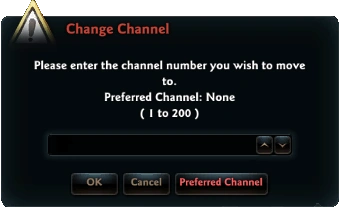
At the right side of this page is image, how the Change Channel Window looks like.
In game at the top right you have number at where channel you are. You can be at the channel 1 to 200.
For changing channel number, simply write your wanted number in the input under the text.
You can also set up your preferred channel number. After leaving the game the channel number will be saved and when you connect again, you connect to channel with preferred number.
How to open this window
You can open this window using two styles.
= Via Menu
First option is via menu. When you open your menu (press T), there is at the left section button with name "Switch Channels". Using this button you open the Change Channel window.
Using icon at right top
At user interface are many shortcuts. For example at right top is shortcut to open the Change Channel window. At this button you can also see channel where you are.