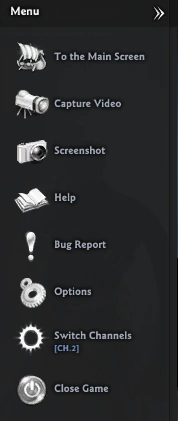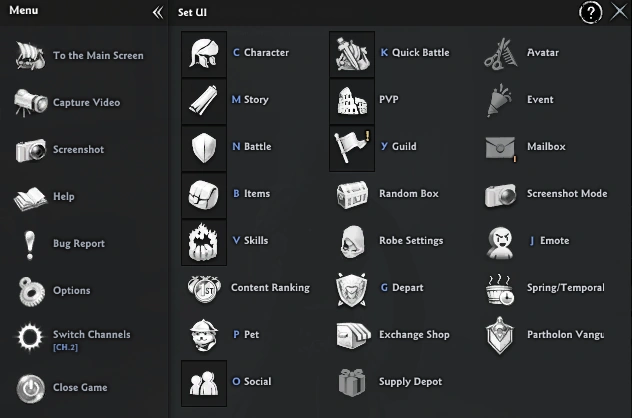
The menu is the main component of the game from where you can control it.
How to open Menu
In the game, you can open this menu using shortcut T.
You can also open the menu using right-click to the icon at the left bottom.
Options
The left side of the menu is probably most used. At this section are following items:
- To the Main Screen
- You will get to the Main Screen.
- You will start recording the game.
- You take the screenshot of the game.
- Bug Report
- Redirects you to [Official Vindictus Forum]
- Switch your channel number to which you want.
- Close Game
- Close the game.
Where shortcut keys exist, they are shown in parenthesis below.
- Character (C)
- Character data, including stats, titles, motto, talent, seal, redeemers, objects, decorations and bond status.
- Story (M)
- Opens story window
- Items (B)
- Open your bags with your loot.
- Skills (V)
- Opens window, where you can upgrade your skills.
- Allies
- Information on mercenaries you have met in the Mercenary Lounge.
- Pet (P)
- Lists available pets and lets you summon dismiss your pets.
- Battle (N)
- Show you the information about the battles.
- Depart (G)
- Quick Departure (K)
- Open window where you can access battles quickly.
- Party
- Deific Devotion
- Partholon Vanguard
- Friends (O)
- Opens window where you can communicate with your friends.
- Guild (Y)
- For creating or joining guilds.
- If you are already in a guild, shows your guild's information.
- Screenshot mode
- Moods
- Emote (J)
- Spring/Temporal
- Lists any hot springs with active soap bonuses and lets you change to the correct channel to access them.
- Lists daily, weekly and monthly missions.
- Event
- Exchange Shop
- Supply Depot
- Avatar
- Discard Item (])
- Event Notices
- E. Share/Transfer
- Cairde
- Story Replay
-
 Fully opened menu
 -
 Half opened menu